WebRAT Malware: How GitHub Repositories Are Being Used to Spread Dangerous Threats
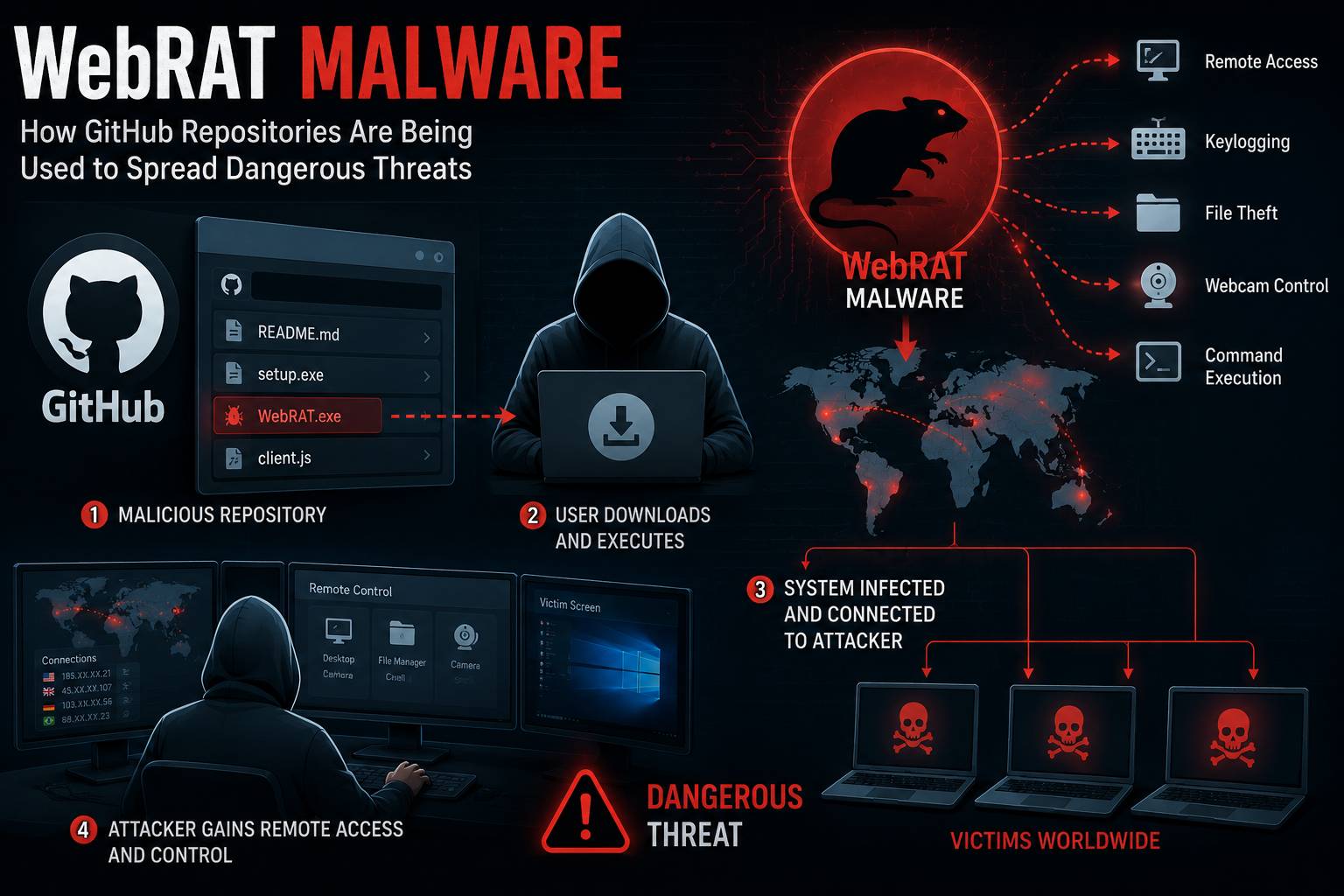
Table of Contents
Cybersecurity researchers have uncovered a disturbing trend: threat actors are increasingly abusing GitHub repositories to distribute a category of malware known as WebRAT — Web-based Remote Access Trojans. What makes this campaign particularly dangerous is the legitimacy that GitHub's platform lends to malicious content. Developers instinctively trust repositories hosted on one of the world's most respected code-sharing platforms. That trust is being weaponized.
What Is WebRAT Malware?
A Remote Access Trojan (RAT) is a type of malware that grants an attacker covert remote control over an infected system. WebRAT variants operate through web-based communication protocols — typically HTTP or HTTPS — making their traffic harder to distinguish from normal browsing activity.
Once installed, a WebRAT can:
- Capture screenshots and keystrokes in real time
- Exfiltrate files from the victim's system
- Execute arbitrary commands on the infected machine
- Download and deploy additional payloads such as ransomware or cryptominers
- Access the webcam and microphone without the user's knowledge
The "Web" prefix means the malware communicates with its command-and-control (C2) server via standard web protocols, letting it blend into legitimate HTTPS traffic and evade many network-based detections.
How Attackers Are Abusing GitHub
GitHub is designed for collaboration. Its openness — anyone can create a repository, upload files, and share links — is also its vulnerability from a security standpoint.
Fake "Tool" Repositories
The most common distribution method involves creating repositories that appear to offer legitimate security tools, game cheats, software cracks, or productivity utilities. The repository has a polished README, fake star counts boosted by compromised accounts, and detailed "installation" instructions. The instructions direct victims to download and run a binary that is, in reality, a WebRAT dropper.
Typosquatting Package Names
Attackers create repositories with names nearly identical to popular open-source projects. A developer searching for requests-http-tools might accidentally clone request-http-tools, which contains a malicious setup.py that executes the WebRAT installer on import.
Compromised Legitimate Accounts
In more sophisticated campaigns, attackers compromise legitimate developer accounts and push malicious commits or releases to trusted repositories. Since the account has a genuine history, security tools and users are far less suspicious.
Abuse of GitHub Actions and Releases
Attackers have also been observed using GitHub Actions to build malware from obfuscated source code at runtime, and using the Releases section to host compiled binaries. GitHub CDN URLs (objects.githubusercontent.com) are rarely blocklisted by enterprise firewalls, making this an effective delivery mechanism.
Real-World WebRAT Campaigns
AsyncRAT is one of the most widely observed WebRAT families distributed via GitHub. In 2024, researchers at Recorded Future and Securonix documented multiple campaigns where AsyncRAT was hosted in GitHub repos disguised as game cheats and cracked software. AsyncRAT uses encrypted communication over TCP but has web-facing panels that classify it within the broader WebRAT family.
XWorm, another prolific RAT, was distributed in 2023-2024 through GitHub repositories masquerading as legitimate PDF tools and video converters. It uses HTTP-based C2 and supports webcam capture, credential theft, and ransomware deployment.
Quasar RAT, though older, continues to appear in GitHub-hosted campaigns targeting developers and IT professionals with fake network monitoring tools.
How to Protect Yourself
Before Cloning Any Repository
- Check the account age and activity: A repository from an account created two weeks ago with 500 stars should raise red flags.
- Read the source code before running it: Never execute binaries from GitHub without reviewing what they actually do.
- Verify the publisher: Cross-reference the repository with the official project website or package registry (PyPI, npm, etc.).
Technical Defenses
- Use endpoint detection and response (EDR) tools that can detect RAT behavior regardless of how the malware arrived.
- Enable application allowlisting so only approved software can execute on sensitive systems.
- Monitor outbound network connections for unexpected HTTPS traffic to unknown hosts.
- Use sandboxed environments for testing unknown software — tools like Any.run or Cuckoo Sandbox can reveal malicious behavior safely.
For Organizations
- Block the execution of unsigned binaries downloaded from the internet on managed endpoints.
- Implement GitHub scanning tools like
git-secretsor integrate GitHub Advanced Security to scan for suspicious patterns. - Train developers to recognize social engineering tactics used to distribute malware through code-sharing platforms.
FAQ
Can GitHub detect and remove malware repositories?
Yes — GitHub has policies against distributing malware and actively removes flagged content. However, new repositories appear constantly, and there is always a window between creation and takedown during which victims can be infected.
Does running git clone infect my system?
Cloning a repository itself is generally safe. The risk comes from executing files within the repository — binaries, scripts, or package installation commands that trigger malicious code.
How can I check if a file from GitHub is malicious?
Upload the file to VirusTotal or run it in a sandbox like Any.run before executing it on your main system.
What should I do if I've already run a suspicious file?
Immediately disconnect from the network, run a full scan with a reputable antivirus tool, change all passwords from a clean device, and consider a full system reinstall if infection is confirmed.
Are WebRAT campaigns only targeting Windows users?
Primarily, yes — most WebRAT campaigns target Windows. However, cross-platform variants targeting macOS and Linux are increasingly common, especially in campaigns targeting developers.
This article is published by ScamSandbox to help users understand and avoid malware threats and online scams.