Fake CAPTCHA Scam (2026): How "ClickFix" Tricks You Into Installing Malware
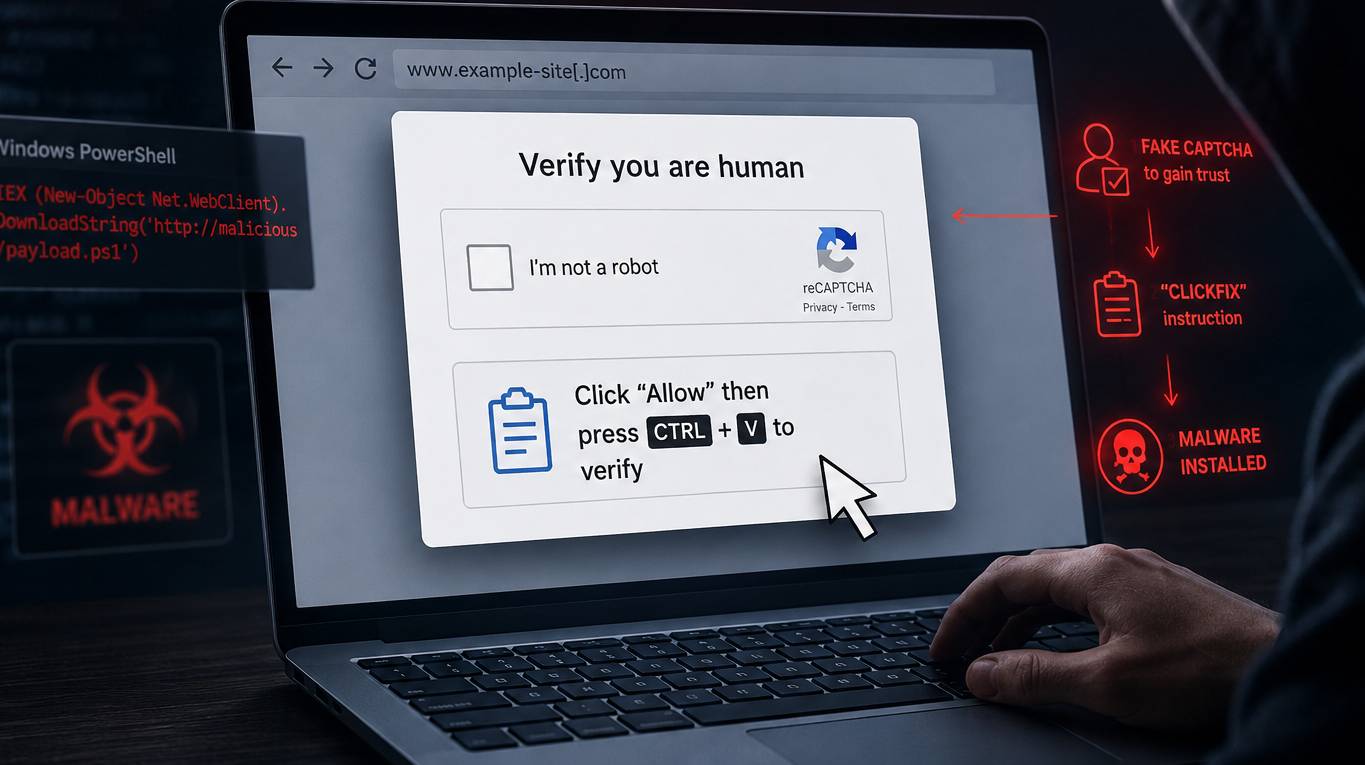
Table of Contents
You land on a website, a "verify you're human" box pops up, and it tells you to press Windows + R, then Ctrl + V, then Enter. It looks like a normal security check. It isn't. You just pasted and ran a hidden command that installs malware on your own computer.
This is the fake CAPTCHA scam — known in the security world as ClickFix — and the U.S. Federal Trade Commission issued a fresh warning about it in June 2026. Here's exactly how it works, why your antivirus often misses it, and what to do if you already followed the steps.
What is the fake CAPTCHA (ClickFix) scam?
A real CAPTCHA asks you to do something inside the browser: type distorted letters, or click every square with a traffic light. That's it. It never asks you to leave the page or run anything on your device.
The fake version copies that familiar look and abuses your muscle memory. The malicious page displays a counterfeit "security verification" overlay — often mimicking Cloudflare Turnstile or Google reCAPTCHA — and instead of a normal challenge, it gives you keyboard "steps" to complete. Those steps quietly open a Windows system tool and run a command the attacker already planted on your clipboard.
The trick is so effective because it isn't a single piece of malware — it's a social-engineering method. You do the dangerous part, which is precisely why it slips past defenses built to catch malicious downloads.
How the fake CAPTCHA attack works, step by step
- The lure. You reach a fake verification page through a malicious ad, a poisoned search result, a phishing email, or — increasingly — a legitimate website that's been hacked. Attack crews like KongTuke have been injecting these overlays into compromised WordPress sites, so the address bar can show a domain you actually recognize.
- Silent clipboard injection. JavaScript on the page copies a long, hidden command to your clipboard the moment the overlay loads. You never see it happen.
- The fake "verification steps." The page instructs you to press
Windows + R(which opens the Run dialog), thenCtrl + V(which pastes the attacker's command), thenEnter(which runs it). - Execution with your privileges. The command typically launches PowerShell or
mshtato pull down the real payload. Because you pressed Enter, no browser download warning fires and no "are you sure?" prompt appears. - Payload. The final stage is usually an infostealer or remote-access trojan. From there, attackers can grab your email logins, banking credentials, browser cookies, and crypto wallets.
The FTC put it plainly: the screen says "security verification," but you're actually following the steps to paste and run hidden malware — and once it's there, scammers can quickly steal email logins, mobile banking credentials, and anything else they can reach.
Why this scam beats your antivirus
Traditional security tools watch for suspicious files being downloaded and opened. ClickFix sidesteps all of that by abusing tools that already ship — signed and trusted — on every Windows machine: PowerShell, mshta, and even nslookup. Microsoft documented a 2026 variant that hides the payload inside a DNS lookup command, and other variants map a remote network share to dodge detection rules entirely.
The numbers explain why criminals love it. ClickFix activity surged roughly 517% in the first half of 2025, and by 2026 it accounts for a large share of the intrusions Microsoft tracks. It's cheap, it's scalable, and the entire attack chain is built out of legitimate-looking user actions.
How to spot a fake CAPTCHA: the red flags
One rule catches nearly every version of this scam:
If a "verification" step tells you to leave your browser, open the Run box, or paste a command — it is not a CAPTCHA. Close the tab.
Watch specifically for:
- "Press Win+R" or "open Terminal" instructions. No legitimate site needs this. Not Microsoft, not Adobe, not your bank.
- A "verification ID" that's hundreds of characters long. Real tokens are short; a giant string is the obfuscated payload.
- A full-page "security check" appearing on a site you've used before that never showed one — a sign the site was compromised.
- A pop-up that says "Press Allow / Copy this command to continue."
- Any prompt to "verify your audio" before joining a video call.
What to do if you already followed the steps
If you ran the command — or noticed something downloading right after a "CAPTCHA" — act immediately. The FTC's guidance:
- Disconnect from the internet. This cuts the attacker off from your accounts while you clean up.
- Run a full security scan to find and remove the malware, and make sure your software is up to date.
- Change your passwords from a different, clean device and turn on two-factor authentication. Prioritize email, banking, and crypto accounts.
- Watch your financial accounts for unauthorized activity over the following weeks.
- Report it to the FTC at ReportFraud.ftc.gov.
How to protect yourself going forward
- Internalize the one rule: a webpage should never ask you to run a command. Ever.
- Teach the people around you — family, coworkers — the Win+R red flag specifically. Awareness is the strongest defense here because the attack relies entirely on human action.
- Keep your OS, browser, and security software patched. Regular updates close vulnerabilities that malware exploits.
- Use a password manager so credentials stolen from one site can't unlock the rest. Learn more about choosing the right password manager.
- For businesses: restrict PowerShell where possible, monitor for unusual
mshta/PowerShell child processes, and add ClickFix scenarios to phishing-simulation training — user awareness fades within months.
Frequently asked questions
Is the fake CAPTCHA scam only on Windows?
The most common version targets Windows because it abuses the Run dialog and PowerShell. But the same "paste this command" trick has been adapted to macOS and Linux terminals, so the core rule applies on every platform.
Can a fake CAPTCHA infect my phone?
The classic ClickFix chain needs a desktop command line, so phones are far less exposed. The bigger mobile risk from these pages is being pushed toward credential-phishing or malicious app installs — still close the tab.
I closed the page without doing anything. Am I infected?
No. The attack only succeeds if you actually paste and run the command. Simply viewing the fake CAPTCHA — even if it copied something to your clipboard — does not infect you. Clear your clipboard to be safe and move on.
How do I know if a CAPTCHA is real?
A real CAPTCHA keeps you inside the browser: typing characters or clicking images. If it ever asks you to press keyboard shortcuts, open a system window, or paste something, it's fake.
Sources: U.S. Federal Trade Commission consumer alert "How to spot a CAPTCHA scam" (June 8, 2026); Microsoft Security and Bitdefender ClickFix research (2026); Sekoia, Trend Micro (KongTuke), and SentinelOne threat reporting.